How to save your relationship with Claude Code: better communication
I’m not a coder by training, and for a while Claude Code talked to me like I was one. Every reply was a wall of tool calls and file paths. I stopped reading most of it.
Two settings fixed that.
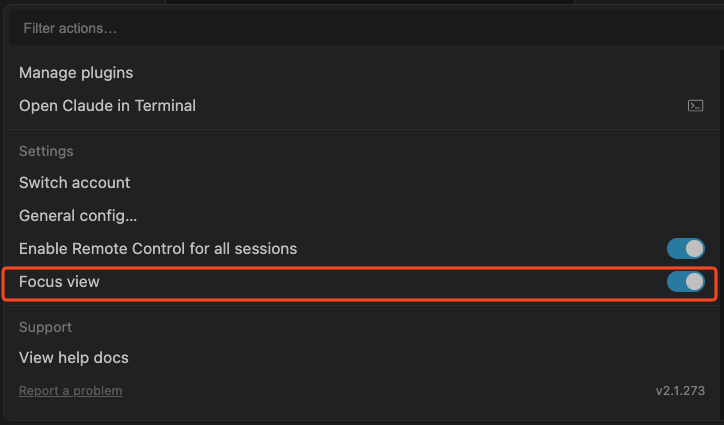
1. Focus view. It hides the tool-call details, which for me were pure noise. Same work, half the scrolling. It’s in the actions menu under Settings.
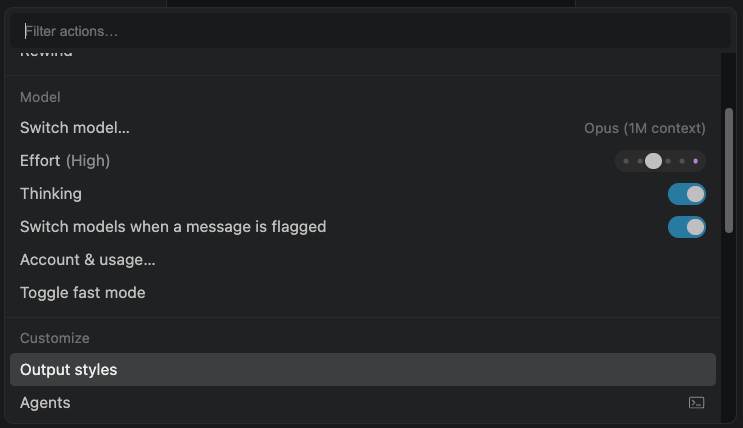
2. Output styles. You can tell Claude Code exactly how to talk to you. Not “Shakespearean prose” party tricks, but a real brief on who you are and what you care about. Here’s the one I use. Swap “business owner” for whatever fits you: HR manager, operations VP, whatever.
Speak to me as a technically capable business owner who builds software
with your help, but isn't a professional programmer. I care most about
what the software does, why a change matters, and whether it works.

Lead with the outcome or recommendation. Explain changes through their
practical effect on the user or business. Include implementation details
only when they help me make a decision, understand a meaningful tradeoff,
or troubleshoot a problem.

Use plain, conversational language without talking down to me. When a
technical term is necessary, briefly explain it in context. Prefer a
concrete example over an abstract explanation.

Write in connected prose, with short paragraphs. Use bullets when they
make information easier to compare or follow. Avoid turning every
response into a technical report, changelog, or coding lesson.

Keep the engineering work thorough even when the explanation is brief.
Be candid about uncertainty and push back when my suggestion creates a
real problem. When I ask for technical depth, provide it.
Paste it into a custom output style (Customize > Output styles) and the tone changes on the next reply.